SFM Compile Explained: The Complete Guide to Compiling Models for Source Filmmaker

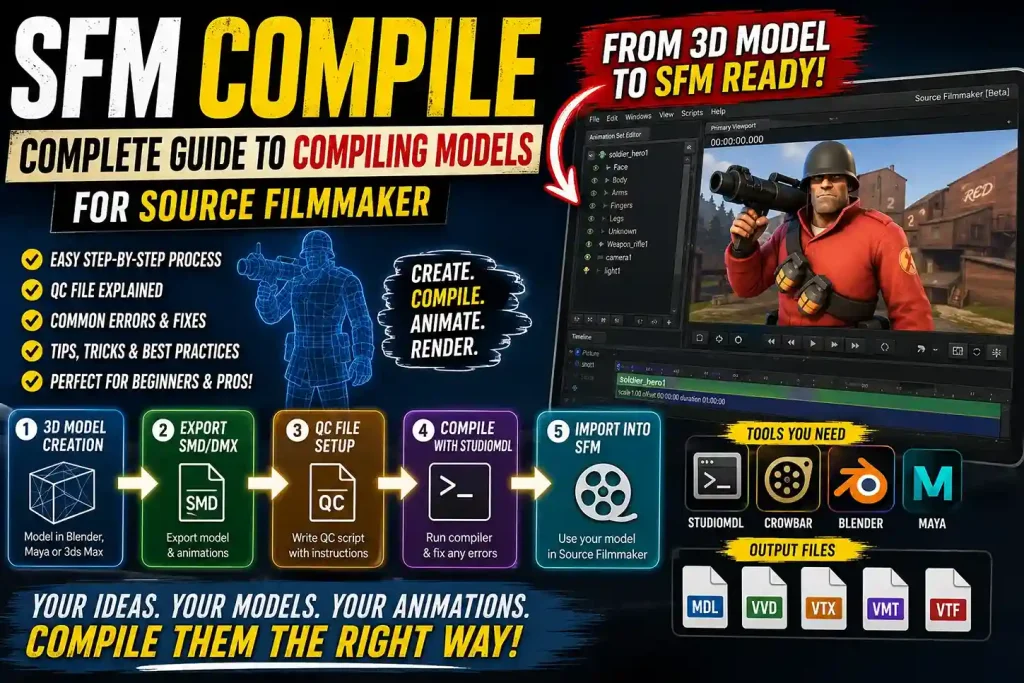
Creating custom models is one of the biggest advantages of Source Filmmaker (SFM). Instead of relying only on the default assets, creators can import original characters, weapons, vehicles, environments, and props to produce unique animations. Before these assets can appear inside SFM, however, they must go through a process called SFM Compile.
SFM Compile is the workflow that converts editable 3D files into formats recognized by the Source Engine. It combines model geometry, textures, animations, materials, and physics information into optimized game-ready files. Without proper compilation, Source Filmmaker cannot load or display custom models correctly.
Although the process may seem technical at first, understanding the basic workflow makes it much easier. Once you learn how each step connects, creating and importing custom assets becomes a repeatable process rather than a difficult challenge.
This guide explains what SFM Compile is, why it matters, the software you need, how the Source Engine compilation pipeline works, and the best practices every beginner should know.
Key Takeaways
| Feature | Details |
|---|---|
| Process | Converts 3D assets into Source Engine models |
| Primary Software | Source Filmmaker |
| Main Compiler | StudioMDL |
| Popular Helper Tool | Crowbar |
| Supported Model Sources | Blender, Maya, 3ds Max |
| Common Export Formats | SMD and DMX |
| Script File | QC File |
| Output Files | MDL, VVD, VTX and related files |
| Best For | Creating custom SFM characters, props, and animations |
What Is SFM Compile?
SFM Compile is the process of transforming a finished 3D model into a format that Source Filmmaker can understand. Programs like Blender or Autodesk Maya create editable project files, but Source Filmmaker cannot read those files directly.
Instead, every model must be compiled into Source Engine model files before it becomes usable inside SFM.
During compilation, several pieces of information are combined, including:
- Model geometry
- Bone hierarchy
- Animation data
- Material references
- Texture paths
- Collision information
- Physics settings
The compiler packages these resources into optimized files that the Source Engine can load efficiently.
Think of compilation like exporting a video. Your editing project contains timelines, effects, and layers, but the final video combines everything into a format anyone can play. SFM Compile performs a similar job for 3D models.
Why Is SFM Compile Important?
Compilation is much more than a technical requirement. It ensures your models work correctly inside Source Filmmaker.
Without compiling, you may encounter problems such as:
- Invisible models
- Missing textures
- Broken animations
- Incorrect skeletons
- Physics errors
- Loading failures
A properly compiled model loads faster, performs better, and behaves correctly during animation.
Whether you’re creating a simple prop or a complex animated character, compilation is one of the final and most important stages of production.
How the SFM Compilation Pipeline Works
Every Source Filmmaker model follows a structured workflow.
Instead of importing files directly from modeling software, assets move through several stages before becoming usable.
Stage 1: Create the Model
Everything begins inside a 3D modeling application.
Artists design:
- Characters
- Weapons
- Buildings
- Vehicles
- Accessories
- Environmental props
During this stage, attention is given to:
- Proper topology
- Correct scale
- UV mapping
- Material assignment
- Skeleton creation
The better the preparation, the smoother the compilation process.
Stage 2: Export the Model
After modeling is complete, the asset must be exported into a Source-compatible format.
The most common formats include:
- SMD
- DMX
These files preserve important information such as:
- Mesh data
- Bones
- Animation
- Vertex weights
Correct export settings are critical because mistakes here often cause problems later.
Stage 3: Build the QC File
The QC file acts as the instruction manual for the compiler.
Rather than containing the model itself, it tells StudioMDL how each file should be processed.
Typical QC instructions define:
- Model name
- Material folders
- Animation sequences
- Collision models
- Surface properties
- Body groups
Without a valid QC file, the compiler cannot assemble the final model correctly.
Stage 4: Compile the Model
Once every file is ready, the compiler begins building the final Source Engine model.
During this step:
- Geometry is processed.
- Materials are linked.
- Animations are attached.
- Physics information is generated.
- Output files are created.
The compiler also checks for errors that may prevent successful completion.
Stage 5: Test Inside Source Filmmaker
Compilation does not end the workflow.
After importing the model into SFM, creators should test:
- Model appearance
- Material quality
- Bone movement
- Animation playback
- Physics behavior
- Lighting response
Testing helps identify issues that require another compilation pass.
Software Required for SFM Compile
Several tools work together during the compilation process.
Each serves a different purpose.
Source Filmmaker
Source Filmmaker is the final destination for compiled assets.
After compilation, creators use SFM to:
- Create scenes
- Animate characters
- Build cinematics
- Render videos
Without SFM installed, testing compiled models becomes impossible.
StudioMDL
StudioMDL is Valve’s official model compiler for the Source Engine.
It converts QC scripts and exported model files into Source-compatible assets.
StudioMDL handles tasks such as:
- Model compilation
- Animation processing
- Collision generation
- Material linking
- Output creation
Nearly every Source Engine model passes through StudioMDL.
Crowbar
Crowbar has become one of the most widely used utilities within the Source Engine community.
Instead of using complicated command-line instructions, Crowbar provides an easier graphical interface.
Its features include:
- Model compilation
- Model decompilation
- Compiler log viewing
- Engine selection
- Error reporting
Many beginners choose Crowbar because it simplifies the overall workflow.
Blender
Blender is one of the most popular free 3D applications for Source Filmmaker creators.
Artists use Blender to create:
- Characters
- Props
- Weapons
- Vehicles
- Environments
- Animation rigs
Its active community and free availability make it an excellent choice for beginners.
Autodesk Maya
Many professional artists prefer Maya because of its advanced animation and rigging capabilities.
Maya is especially popular for:
- Character animation
- Facial rigs
- High-quality production workflows
Although it requires a commercial license, it remains a leading tool in the industry.
3ds Max
3ds Max has long been associated with Source Engine development.
Many older Source Engine assets were originally created using this software.
It continues to provide strong modeling capabilities for SFM creators.
Understanding Common File Types
One aspect that confuses beginners is the number of files involved during compilation.
Each file serves a specific purpose.
| File Type | Purpose |
|---|---|
| SMD | Stores model geometry and animation |
| DMX | Modern Source Engine model format |
| QC | Compilation instructions |
| MDL | Main compiled model |
| VVD | Vertex data |
| VTX | Rendering optimization |
| VMT | Material configuration |
| VTF | Texture image |
Although several files are generated, they all work together to create one complete model inside Source Filmmaker.
Preparing a Model Before Compilation
Successful compilation begins long before opening the compiler.
A well-prepared model significantly reduces errors.
Before exporting, check the following:
Correct Scale
Models should match the scale used by the Source Engine.
Incorrect scaling often leads to oversized or miniature models inside SFM.
Clean Geometry
Remove:
- Duplicate vertices
- Hidden faces
- Unused objects
- Broken normals
Clean meshes compile more reliably.
Proper UV Mapping
Textures rely on accurate UV coordinates.
Poor UV mapping can result in:
- Stretched textures
- Misaligned materials
- Visible seams
Taking time to organize UVs improves the final appearance.
Organized Materials
Material names should remain consistent throughout the project.
Using clear naming conventions makes troubleshooting much easier during compilation.
Working Skeleton
Animated models require a properly constructed armature.
Bones should be:
- Correctly named
- Properly weighted
- Logically organized
Problems within the skeleton often produce animation errors after compilation.
Expert Insight
Many beginners believe that SFM Compile is the hardest part of creating custom Source Filmmaker content. In reality, the compiler simply processes the information it receives. Most compilation errors originate from earlier stages such as incorrect model scaling, missing textures, broken UV maps, or improperly configured QC files. Spending extra time preparing clean assets before compiling dramatically reduces troubleshooting later and leads to more reliable, professional-quality models.
Step-by-Step SFM Compile Process
Compiling a model for Source Filmmaker follows a logical sequence. Understanding each stage makes troubleshooting much easier and helps produce cleaner, more reliable models.
Rather than rushing through the process, experienced creators carefully verify each step before moving to the next.
Step 1: Build Your 3D Model
Every project begins inside a 3D modeling application.
Whether you’re creating a simple prop or a fully animated character, the model should be completed before export.
During modeling, pay attention to:
- Accurate proportions
- Clean topology
- Proper edge flow
- Correct object names
- Organized collections or layers
A well-built model is much easier to compile than one filled with unnecessary geometry.
Step 2: Apply Materials and Textures
After modeling is complete, assign materials to every visible surface.
Typical assets include:
- Diffuse textures
- Normal maps
- Specular maps
- Transparency maps
Keeping texture files organized inside clearly named folders helps prevent missing material errors later.
Step 3: Create a Skeleton
Characters and animated objects require bones.
The skeleton determines how different parts of the model move during animation.
A proper rig should include:
- Correct bone hierarchy
- Logical naming
- Smooth weight painting
- Stable joint placement
Even small rigging mistakes can produce unusual animation problems after compilation.
Step 4: Export Source-Compatible Files
Once everything has been prepared, export the model into a format supported by the Source Engine.
Most creators choose either:
- SMD
- DMX
During export, verify:
- Scale settings
- Bone orientation
- Animation frames
- Material references
Exporting with incorrect settings is one of the most common reasons for compilation failures.
Step 5: Write the QC File
The QC file acts as the blueprint for StudioMDL.
Instead of storing geometry, it tells the compiler how every asset should be assembled.
A QC script may define:
- Model location
- Body mesh
- Material directory
- Animation sequences
- Surface properties
- Collision model
Every command inside the QC file serves a specific purpose.
Incorrect syntax can stop the compilation process immediately.
Step 6: Compile the Model
After preparing all required files, launch the compiler.
This can be done using:
- StudioMDL
- Crowbar
During compilation, the software checks every referenced file before generating Source Engine model files.
If problems exist, the compiler normally reports them through an error log.
Step 7: Test Inside Source Filmmaker
Successful compilation does not guarantee a perfect model.
Always test your finished asset inside Source Filmmaker.
Check for:
- Correct textures
- Proper lighting
- Working animations
- Smooth bone movement
- Accurate collision
- Expected proportions
Testing allows you to identify problems before using the model in larger animation projects.
Understanding the QC File
The QC file is one of the most important components of the entire workflow.
Without it, StudioMDL has no instructions for creating the final model.
Think of the QC file as a construction blueprint.
The materials, animations, and geometry already exist, but the blueprint tells the builder exactly how everything fits together.
Common QC Commands
| QC Command | Purpose |
|---|---|
$modelname | Defines the output model name |
$body | Specifies the primary mesh |
$cdmaterials | Sets the material folder |
$sequence | Adds animation sequences |
$collisionmodel | Creates collision data |
$surfaceprop | Defines physical surface behavior |
$bodygroup | Supports multiple model variations |
$attachment | Creates attachment points |
Learning these commands helps creators troubleshoot problems much faster.
Common Compilation Errors
Even experienced artists encounter compilation issues.
Fortunately, most problems have straightforward solutions.
Missing Textures
This is one of the most common issues.
Possible causes include:
- Incorrect material paths
- Missing VTF files
- Missing VMT files
- Folder structure errors
Always verify that material folders match the paths defined inside the QC file.
Invisible Models
Sometimes the compiler finishes successfully, but nothing appears inside Source Filmmaker.
Possible reasons include:
- Incorrect export scale
- Broken QC references
- Missing mesh files
- Wrong model directory
Checking compiler logs usually reveals the source of the problem.
Broken Animations
Animations may appear distorted if:
- Bone names changed
- Skeleton hierarchy differs
- Weight painting contains errors
- Animation exports were incomplete
Using the same skeleton throughout the project helps avoid these issues.
Compilation Stops Unexpectedly
Compilation may fail before generating output files.
Typical causes include:
- Missing files
- Typing mistakes inside QC scripts
- Unsupported characters in filenames
- Incorrect folder locations
Reading the compiler log carefully often provides the exact error location.
Troubleshooting Checklist
Before compiling again, verify the following:
✅ Model exports correctly
✅ Materials exist in the correct folders
✅ Texture paths are accurate
✅ QC commands contain no typing errors
✅ Animation files are present
✅ Skeleton matches exported files
✅ Folder structure follows Source Engine conventions
Working through this checklist can solve many problems without requiring major changes.
Best Practices for Reliable SFM Compile
Professional creators follow consistent workflows that reduce errors and improve efficiency.
Keep Your Project Organized
Create separate folders for:
- Models
- Textures
- Materials
- Animations
- QC files
- Source files
Good organization saves significant time during larger projects.
Use Clear Naming Conventions
Avoid filenames such as:
- model1
- final_final
- newmesh
Instead, use descriptive names like:
- soldier_body
- robot_idle
- warehouse_prop_large
Clear names reduce confusion when projects become more complex.
Optimize Before Compiling
Large models consume more memory and increase rendering time.
Optimization techniques include:
- Removing hidden geometry
- Reducing unnecessary polygons
- Merging duplicate vertices
- Compressing large textures
- Deleting unused materials
Efficient models perform better inside Source Filmmaker without sacrificing visual quality.
Expert Insight
The fastest SFM creators are rarely the ones who compile the quickest—they are the ones who make the fewest mistakes before pressing the compile button. A clean folder structure, consistent file names, properly prepared meshes, and carefully written QC scripts eliminate many common errors before they occur. Developing disciplined project organization early will save countless hours as your Source Filmmaker projects become larger and more complex.
Advanced SFM Compile Techniques
Once you understand the basics, you can begin using more advanced compilation features. These techniques allow creators to build professional-quality assets with greater flexibility and realism.
Compiling Multiple Animation Sequences
A single model can contain several animations.
Instead of creating separate models for every movement, multiple sequences can be compiled into one character.
Examples include:
- Idle
- Walk
- Run
- Jump
- Attack
- Reload
- Facial expressions
Organizing animations this way keeps projects cleaner and easier to manage.
Creating Body Groups
Body groups allow one model to support different visual variations.
For example, a character might include:
- Different helmets
- Multiple hairstyles
- Alternate clothing
- Optional accessories
- Various weapons
Rather than compiling several separate models, creators can switch between body groups directly inside Source Filmmaker.
Using Multiple Skins
Skin families provide another level of customization.
Instead of changing geometry, they change textures.
Examples include:
- Different colors
- Battle damage
- Seasonal appearances
- Team uniforms
- Alternate materials
This reduces file duplication while increasing creative options.
Collision Models
Physics becomes much more realistic when collision models are included.
A collision model determines how an object interacts with the environment.
Common examples include:
- Characters standing on surfaces
- Props falling naturally
- Objects colliding correctly
- Physics simulations
Simple collision meshes usually perform better than highly detailed ones.
Performance Optimization
Good-looking models are important, but performance matters just as much.
Heavy assets can slow down Source Filmmaker, especially in complex scenes.
Reduce Polygon Count
High-polygon models consume more resources.
Before compiling, remove:
- Hidden faces
- Duplicate geometry
- Tiny unnecessary details
- Internal meshes that are never visible
Optimized models render more efficiently.
Compress Texture Sizes
Very large textures increase memory usage.
Choose texture resolutions appropriate for the asset.
| Asset Type | Suggested Texture Size |
|---|---|
| Small Props | 512 × 512 |
| Medium Objects | 1024 × 1024 |
| Characters | 2048 × 2048 |
| Hero Assets | 4096 × 4096 (only if necessary) |
Using appropriate resolutions helps balance image quality and performance.
Remove Unused Materials
Many imported models contain materials that are never used.
Cleaning these before compilation reduces clutter and minimizes loading issues.
Keep Bone Counts Reasonable
Characters with hundreds of bones require more processing.
Only include bones that contribute to animation.
Removing unnecessary helper bones improves performance.
Beginner Tips for Learning SFM Compile
Learning Source Engine workflows takes patience.
These tips can make the learning process much smoother.
Start With Simple Models
Avoid beginning with highly detailed characters.
Instead, practice compiling:
- Crates
- Chairs
- Tables
- Barrels
- Simple props
These projects introduce the workflow without overwhelming beginners.
Learn One Tool at a Time
Don’t try to master every program immediately.
A practical learning path is:
- Blender
- Export tools
- QC files
- Crowbar
- StudioMDL
- Source Filmmaker
Building knowledge gradually leads to faster progress.
Keep Backup Copies
Always save backup versions before making major changes.
Good version management allows you to return to a working project if something breaks.
Read Compiler Logs
Many beginners ignore compiler messages.
In reality, the log usually explains exactly why compilation failed.
Learning to interpret these messages saves hours of troubleshooting.
SFM Compile vs Modern Game Engine Pipelines
Although Source Engine workflows are older than modern engines, they still offer powerful customization.
| Feature | SFM Compile | Unity | Unreal Engine |
|---|---|---|---|
| Model Compiler | StudioMDL | Built-in Importer | Built-in Importer |
| Script File Required | Yes (QC) | No | No |
| Main Model Format | MDL | FBX, glTF | FBX, glTF |
| Animation Support | Excellent | Excellent | Excellent |
| Learning Difficulty | Moderate | Beginner-Friendly | Intermediate |
| Custom Control | Very High | High | High |
Modern engines simplify importing, while Source Engine provides greater manual control through QC scripting.
Frequently Asked Questions
What does SFM Compile mean?
SFM Compile is the process of converting custom 3D models into Source Engine-compatible files that can be loaded and animated inside Source Filmmaker.
Is Crowbar required?
No.
You can compile models using StudioMDL directly, but Crowbar provides a much simpler graphical interface that most creators prefer.
Can Blender models be used in Source Filmmaker?
yes
Blender models can be exported to Source-compatible formats such as SMD or DMX and then compiled using StudioMDL.
Why are my textures missing?
Missing textures usually occur because.
VMT or VTF files are missing.
Material paths are incorrect.
Folder locations don’t match the QC file.
Checking file paths carefully usually resolves the issue.
How long does SFM Compile take?
Simple props often compile within a few seconds.
Complex characters with multiple animations and physics data may require several minutes, depending on hardware and project size.
Do I Need Programming Knowledge?
No.
Basic file management and an understanding of QC commands are generally sufficient. While QC files use a script-like format, they are much simpler than traditional programming languages.
Final Verdict
SFM Compile is an essential part of creating custom content for Source Filmmaker. Although it may appear complicated initially, the workflow becomes straightforward once you understand how models, textures, animations, QC scripts, and compilation tools work together. By preparing clean assets, organizing project files, using reliable tools like StudioMDL and Crowbar, and testing models thoroughly after compilation, creators can produce high-quality Source Engine assets suitable for professional animations and cinematic projects.
Final Thoughts
Mastering SFM Compile is not about memorizing every command but about understanding the complete workflow from model creation to final testing. Every successful project begins with well-prepared assets and careful organization before the compiler is ever launched. As your experience grows, you’ll spend less time fixing errors and more time creating impressive Source Filmmaker scenes. With consistent practice and attention to detail, SFM Compile becomes a dependable bridge between your creative ideas and fully functional, animation-ready models.
She holds advanced qualifications in Sociology, Anthropology, and Ethnic Studies, fields that focus on human cultures, traditions, migration patterns, and identity development across the world. Her expertise allows her to break down complex cultural topics into easy-to-understand articles that readers genuinely enjoy.
Over the years, Milana has researched hundreds of public figures, communities, and global ethnic groups, making her a trusted voice in the ethnicity niche. Her writing combines factual research, historical understanding, and modern cultural analysis to ensure every article is informative, reliable, and reader-friendly.
Her work focuses on:
* Ethnicity and ancestry research
* Cultural identity and heritage
* Nationality and family background
* Celebrity ethnicity breakdowns
* Global traditions and multicultural studies
Milana’s goal is to provide readers with authentic, well-researched, and trustworthy information while celebrating the diversity of cultures around the world. Through her detailed research and passion for cultural education, she continues to help audiences better understand ethnicity, heritage, and identity in today’s connected world.
- Jelly Roll and Bunnie Divorce: What We Know About Their Marriage - September 12, 2026
- Liam Neeson and Pamela Anderson: Their Relationship, The Naked Gun, and Where They Stand Now - September 11, 2026
- Kylie Jenner and Timothée Chalamet: Their Relationship, Timeline, and Latest Update - September 11, 2026